


What Is Computer Vision: Seeing with the Human Eye, Understanding with a Machine Brain
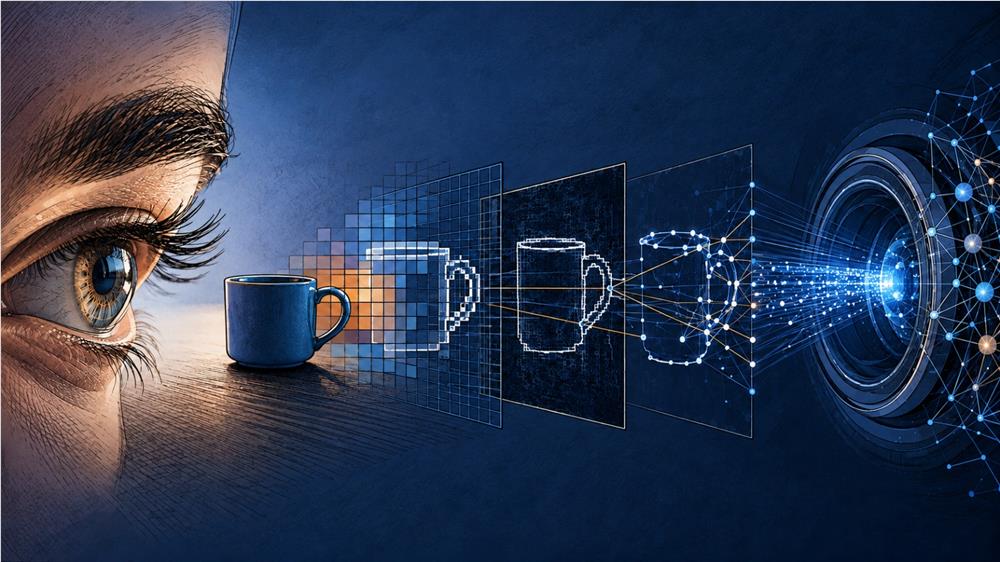
When we look at a photograph or an object, how do we see it, or how do we decide what this thing we're seeing is? When the human eye looks at an image or an object, it actually sees very simple things: colors, shapes, objects... In fact, most of the time our brain does this without thinking. For us, an image carries a "meaning"; thanks to this, we can instantly distinguish a face, a car, or a landscape.
But what about computers? For them, the situation is very different. What a computer sees when it looks at a photograph is a huge numerical matrix made up of millions of pixels. Each pixel has a color value, but this information alone doesn't mean anything to the computer. It is precisely at this point that the field of computer vision tries to fill this gap, that is, to transform raw pixel masses into meaningful information.
What Is Image Processing?
Image processing is putting a photograph or a visual through various operations in order to make it easier for the computer to understand, in line with the purpose we will use it for, and transforming it into the state we want. Generally, the point where the term image processing is confused is that we assume it provides a solution to the question "What am I seeing?", whereas image processing focuses on the question "How do I make the image better?" Operations such as increasing contrast, reducing noise, sharpening edges, or altering the dimensions of the image all fall into this category. In other words, image processing is concerned with the image itself; it deals not with what the content is, but with how it looks.
What Is Image Matching?
Now let's add a slightly different perspective to the questions we've asked and focus on: "I have two different photographs. Do they show the same thing?" This question is the fundamental question of image matching. Image matching examines the relationship of similarity or sameness between two images. This relationship is not always as simple as it seems. Sometimes it's because the object is seen from different angles, sometimes because it's under different lighting or in different locations, and sometimes because the object being searched for is found within a larger image.
Well, since these pixels alone don't mean anything to the computer, how does image matching work then. A typical classical matching system consists of the following stages:
Keypoints are found.
The surroundings of these points are defined with a descriptor (defining feature).
The descriptors in the two images are compared.
Unreliable matches are eliminated.
The remaining matches are geometrically verified.
Now let's examine these stages.
1. Keypoint Detection
At this stage, we first determine the distinctive points of the image using the algorithms we use. These points are generally not points like a pixel in the middle of a flat wall that is almost entirely the same as its neighbors; rather, they are edges, corners, or blobs. The reason for this is that an edge intersection or a bright region on a dark area (blob) is much more distinct and identifiable. Such points are called keypoints.
We can use different approaches to detect these points. For example, the Harris Corner Detector. This method mathematically calculates which regions are "corners" by examining brightness changes in the image. SIFT (Scale-Invariant Feature Transform), on the other hand, finds points unaffected by either scale or rotation by scanning the image at different scales; this way, it can detect the same points again even if the same object appears at different sizes or angles. More recent and faster algorithms such as ORB (Oriented FAST and Rotated BRIEF) are preferred more for real-time applications, because they are both lightweight in terms of computational load and give sufficiently reliable results.
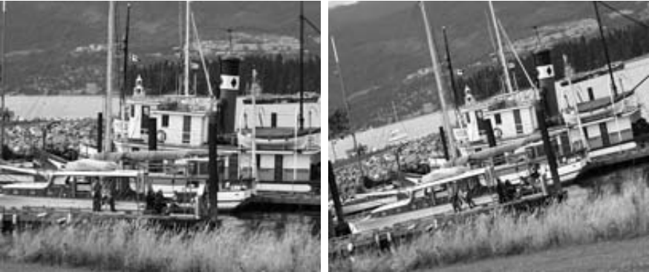
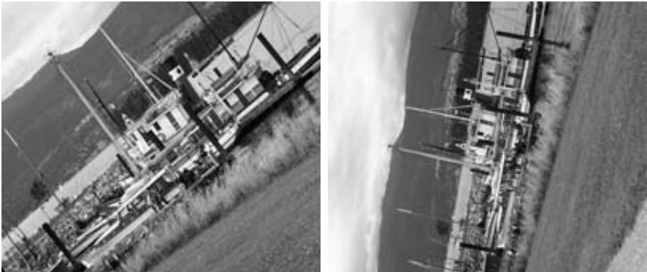
(SIFT ile dönüştürülen görsel)
2. Extracting Descriptors
Let's say we found a keypoint, is that alone enough? Of course not; because detecting any corner or blob does not mean that corner or blob has a counterpart in another image. It is exactly at this part that the descriptor comes into play. A small region around each keypoint is examined and the visual features of this region are converted into a numerical vector, that is, a descriptor. The descriptor is that point's distinctive feature, a kind of "fingerprint." It encodes information such as brightness changes, edge directions, or texture in the form of a numerical vector. Thus, the more visually similar two points in two different images are to each other, the smaller the mathematical distance between these vectors will be.
3. Comparing Descriptors (Matching)
We extracted the keypoints and their descriptors, now it's time to match the points in the two images with each other. The simplest method for this is brute-force matching: each descriptor in the first image is compared with all descriptors in the second image, and the closest (most similar) pair is accepted as the match. This method is not very practical because as the image, and therefore the number of keypoints, increases, it becomes considerably slower. In this case, approximate nearest neighbor search methods such as FLANN (Fast Library for Approximate Nearest Neighbors) come into play and make the process much faster.
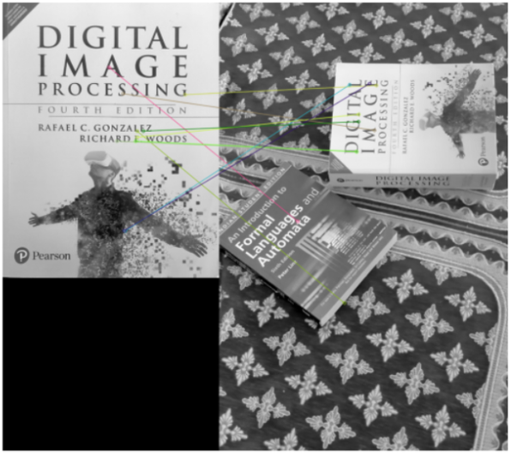
(FLANN çıktısı)
4. Eliminating Unreliable Matches
As a result of the operations carried out up to these stages, we obtained many matches. Well, are all of these matches obtained correct? No, some points may of course resemble each other by coincidence. There are many methods used to sift out these incorrect matches. Here we will talk about one of the commonly used methods, the "ratio test." In this test, a point's two nearest neighbors are compared: if the nearest neighbor is significantly closer than the second nearest neighbor, this match is considered reliable. If the difference is very small, the probability that this match is random is high, and it is eliminated.
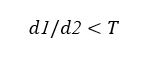
(Lowe's ratio test)
5. Geometric Verification
In the final step, we check whether the remaining matches truly represent a consistent geometric transformation. If two images show the same object, there must be a certain mathematical transformation (for example, a homography or a fundamental matrix) between the matched points. At this stage, we mostly use the RANSAC (Random Sample Consensus) algorithm. RANSAC selects a small random group from among the matches and establishes a transformation model that fits this group, then checks how well all the other matches fit this model. Matches that don't fit the model, that is, that are "outliers," are eliminated; the remaining ones are accepted as true and reliable matches.
Modern Computer Vision
The five-stage process we've described actually forms the foundation of classical computer vision, and each stage is based on hand-designed rules. That is, an engineer decides which point will be considered "interesting," which features will be included in the descriptor. Nowadays, however, we perform a large part of these steps with deep learning models that learn on their own from data. The foundation of this lies in an architecture called CNN (Convolutional Neural Network). CNNs process the image through their layers, learning first simple features (edges, color transitions), then more complex features (shapes, texture patterns), and finally the objects themselves. In other words, the concept of "descriptor" that we defined by hand in classical methods is automatically discovered by the CNN within its own training process.
One of the most tangible examples of this approach today is the YOLO (You Only Look Once) algorithm. YOLO processes an image in a single pass, both detecting and classifying all the objects within it. That is, as its name suggests, it produces fast and real-time results by looking at the image only "once." Instead of first searching for keypoints and then comparing these points one by one as in the classical matching methods mentioned above, YOLO passes the entire image through a CNN and directly produces results such as "there is a car here, there is a person there." This makes it much more practical and useful compared to classical methods, especially in systems that require object detection—such as autonomous vehicles, security cameras, and quality control systems.
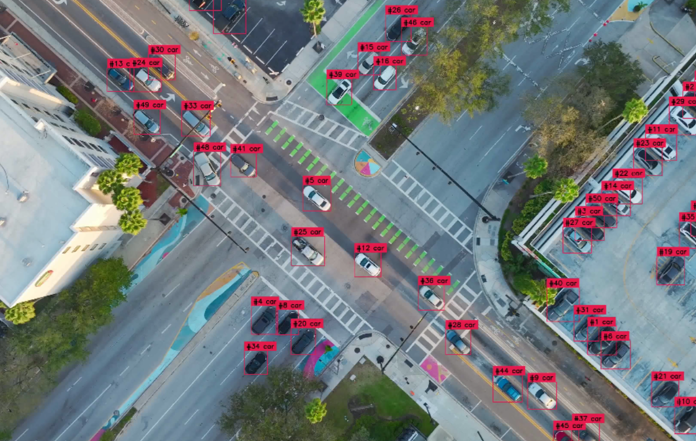
Of course, this does not mean that classical methods have become completely unnecessary. Training CNN-based models requires large amounts of data and processing power. Whereas classical methods can work with fewer resources, in a more interpretable way. For this reason, many systems today use both approaches together according to their needs.
In Conclusion
As we can see, this act of seeing that a human performs instantly is actually quite a layered engineering process for a computer. This process, which we have progressed through from the finding of keypoints to reaching meaningful information from raw pixels, has become even more powerful today with deep learning-based approaches, yet the fundamental logic remains the same: to teach the computer not "to see," but to "make sense of" what it sees.
-Ömer Çıtırık
Categories
Latest Posts
-
 What Is Computer Vision: Seeing with the Human Eye, Understanding with a Machine Brain
 -
 Let the data speak for itself: Do you truly know your data before building a machine learning model?
 -
 The Boots Of The Internet Traffic
 -
ARTIFICIAL INTELLIGENCE
-
 API Gateway Architecture
 -
Prompt Techniques for Smarter and More Efficient Work: A Guide to Maximizing Artificial Intelligence